
Read Chan (Donate): 4chan Browser2.0.75 - Google Play
You'll be able to see results in few seconds.
Publisher Description
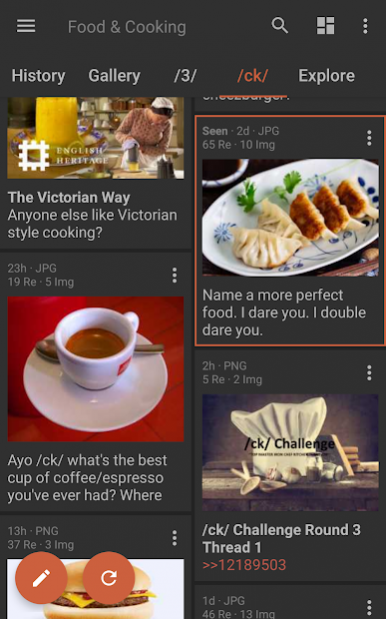
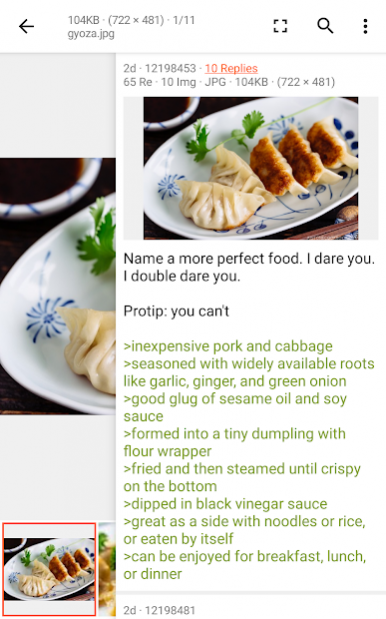
Browsing for 4chan made fun and simple with an app that focuses on fast navigation and customizable layouts.
- View all your boards in a customizable tab layout
- Swipe right on view to dismiss comment or image views
- Swipe left on image viewer to see comments preview
- Different color and boarder themes to choose from
- History, bookmarks, and gallery tabs available on the home page
- Searchable content with highlight
- Supports 4chan Pass
This app is made with an emphasis on fast and easy navigation. Most commonly used features are within easy reach of your thumb without stretching.
About Read Chan (Donate): 4chan Browser
The company that develops Read Chan (Donate): 4chan Browser is Deezus. The latest version released by its developer is 2.0.75.
To install Read Chan (Donate): 4chan Browser on your Android device, just click the green Continue To App button above to start the installation process. The app is listed on our website since 2020-05-24 and was downloaded 0 times. We have already checked if the download link is safe, however for your own protection we recommend that you scan the downloaded app with your antivirus. Your antivirus may detect the Read Chan (Donate): 4chan Browser as malware as malware if the download link to com.deezus.paidchan is broken.
How to install Read Chan (Donate): 4chan Browser on your Android device:
- Click on the Continue To App button on our website. This will redirect you to Google Play.
- Once the Read Chan (Donate): 4chan Browser is shown in the Google Play listing of your Android device, you can start its download and installation. Tap on the Install button located below the search bar and to the right of the app icon.
- A pop-up window with the permissions required by Read Chan (Donate): 4chan Browser will be shown. Click on Accept to continue the process.
- Read Chan (Donate): 4chan Browser will be downloaded onto your device, displaying a progress. Once the download completes, the installation will start and you'll get a notification after the installation is finished.
Program Details
System requirements
Download information
Pricing
Version History
version 2.0.75
posted on 2020-05-24
Fixed a bug where pressing the back button does not exit the app.
Made a minor change to the way comment posts are submitted.
Made minor changes to the looks and feels of the UI.
version 2.0.73
posted on 2020-05-12
Change the name of the tab that shows all unselected boards from "Boards" to "Explore".
Added tab to show all selected boards.
version 2.0.72
posted on 2020-04-29
Added option on the post submission page to view the 4chan ban status of the device.
version 2.0.71
posted on 2020-04-19
Added auto refresh to comment feed. Auto refresh can be change in Settings -> Feed.
The number of columns of card displayed in the catalog feed view can now be changed. You can choose to display either 2 or 3 columns. Option can be changed in Settings -> Feed.
version 2.0.70
posted on 2020-03-24
Image viewer can now view images at original quality. The old viewer downscales large images to 2048 pixels.
Added ability to mark an image as spoiler.
Made the video progress controller seek bar a bit more responsive to touch gestures.
version 2.0.68.1
posted on 2020-02-29
Fixed a bug where user ids where not showing up on /biz/ comments.
Fixed a bug where the video player would freeze on Nokia phones.
Fixed a bug where loading certain Gifs would cause the app to crash on Samsung Galaxy phones.
version 2.0.60
posted on 2020-01-18
Set the bottom navigation bar colour to always be black.
version 2.0.59
posted on 2019-12-22
Added option to review your ban status if you submitted a post and you were banned from posting.
Changed submission failure message prompt. It will now only show the failure reason and not the response metadata.
version 2.0.58
posted on 2019-12-04
Fixed bug where feed filters were not being applied to certain threads.
Added option to hide album image details. Option can be found in Settings -> Images and Video -> Show album image detail.
version 2.0.56
posted on 2019-11-21
Added feed filters
Disclaimer
Official Google Play Link
We do not host Read Chan (Donate): 4chan Browser on our servers. We did not scan it for viruses, adware, spyware or other type of malware. This app is hosted by Google and passed their terms and conditions to be listed there. We recommend caution when installing it.
The Google Play link for Read Chan (Donate): 4chan Browser is provided to you by apps112.com without any warranties, representations or guarantees of any kind, so access it at your own risk.
If you have questions regarding this particular app contact the publisher directly. For questions about the functionalities of apps112.com contact us.
